 SchedPilot
How to Write a Bio for Instagram (The 150 Characters That Actually Convert)
Your Instagram bio is the highest-leverage 150 characters in your entire marketing. Someone lands on your profile, scans it for two seconds, and decides whether to follow you, click your link, or leave. That decision is made almost entirely by your bio.
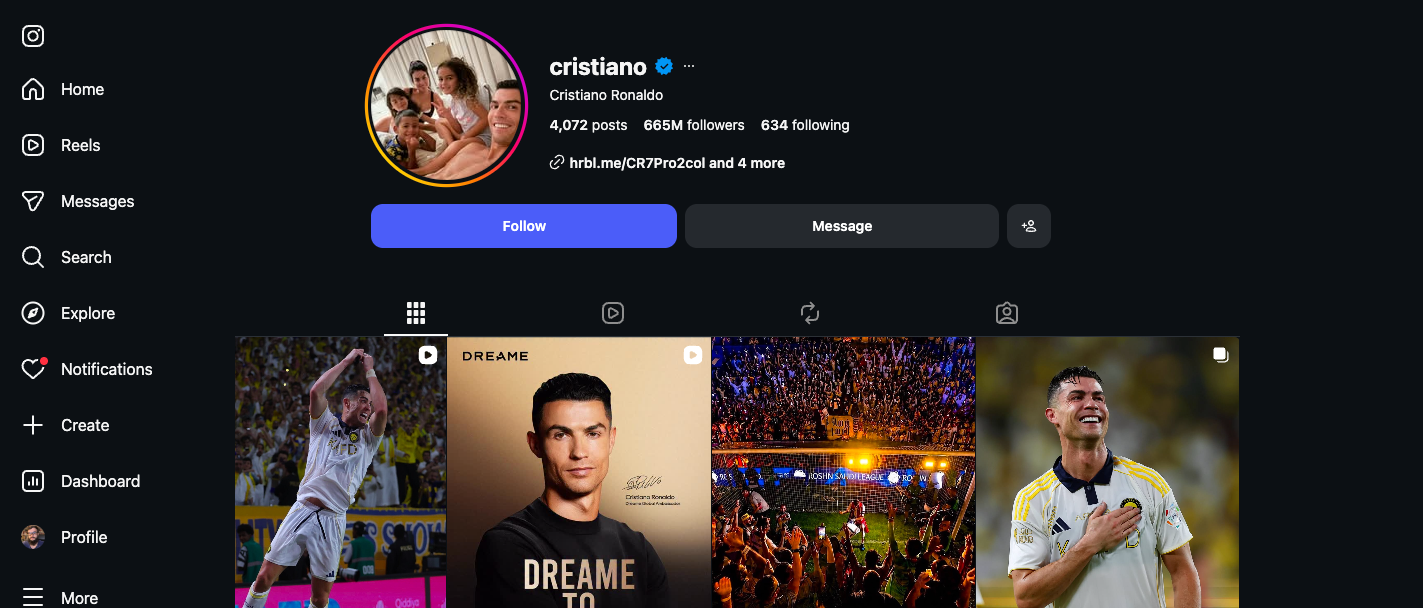
Most guides on this topic give you 400 copy-paste examples. That’s a fine starting point if you want to sound like everyone else. This guide does something different — it gives you the framework to write a bio that’s specific to you, plus the 2026 updates (multiple native links, bio search indexing, no more Linktree) that change how the bio actually works now.
Try SchedPilot for free
Free trial · No upfront payment · 10+ platforms
Post on 10 platforms at once. Great for influencers, marketers, agencies.
What Your Bio Actually Has to Do
Before writing a single character, understand the job. A profile visitor has roughly seven seconds and three questions:
- Who is this? (Name, role, niche)
- Why should I care? (Value, specificity, social proof)
- What do you want me to do? (Follow, click, DM, buy)
If your bio answers all three in under 150 characters, it works. If it answers fewer than three — even if it’s beautifully written — it leaks visitors. That’s the entire framework.
Generic bios fail because they answer #1 only. “Coffee enthusiast | Adventure seeker | Living my best life” tells someone who you are vaguely, gives them no reason to care, and asks for nothing. It’s the bio equivalent of small talk.
The Bio Formula That Works
Almost every effective Instagram bio follows the same four-line structure. Memorize this:
Line 1: WHO you are (specific role + niche)
Line 2: WHAT you do (the value or transformation you offer)
Line 3: PROOF or PERSONALITY (credential, stat, or distinct voice)
Line 4: CTA + LINK (what to do next)
Here’s the same skeleton applied to four different account types:
Creator / personal brand:
Travel photographer 📸
Helping you take iPhone shots like a pro
Featured in Condé Nast Traveler ✨
👇 Free preset pack
Small business / e-commerce:
Handmade ceramic homeware 🏺
Made in Brooklyn, shipped worldwide
3,000+ five-star reviews
👇 Shop the collection
Service / coach / consultant:
Career coach for tech professionals
Helping engineers move into staff roles
ex-Google, ex-Stripe
👇 Book a free intro call
Local business:
Pizza by the slice in Williamsburg 🍕
Open 11am–11pm, 7 days
"Best slice in NYC" — TimeOut
👇 Order delivery
Notice what each one does: states a specific role, names the audience or value, drops one credible signal, and points clearly to the next action. No fluff, no aesthetic vibe-tunes, no emoji barrages. Just signal.
You don’t need to use this exact format with line breaks — some niches favor a single-line conversational bio. But the four jobs (who, what, proof, CTA) need to be done somehow, even if the structure looks different.
The 2026 Updates Most Articles Are Missing
If you’ve read older bio guides, your mental model is probably out of date. Three things changed recently that are genuinely important.
Bio text is now indexed in Instagram search
For most of Instagram’s history, search matched usernames and account names — not bio text. That changed. Instagram’s search now uses words from your bio to determine whether your account surfaces for niche-related searches.
If you’re a fitness coach, the word “fitness” needs to be in your bio. If you make videos for first-time investors, the word “investor” or “investing” should appear literally. The implication: you’re not just writing for visitors who already found you, you’re writing to get found in the first place.
This doesn’t mean keyword-stuffing — that reads as desperate and dilutes your value prop. It means making sure the one or two words that someone would type into Instagram search to find someone like you are actually present in your bio.
Multiple native links replaced Linktree
For years, Instagram gave you exactly one clickable link, which spawned an entire industry of link-aggregator tools (Linktree, Beacons, Stan Store, etc.) that lived in that single slot.
That’s no longer necessary. Instagram now supports multiple native links directly in your bio — typically up to five, depending on your account type. You can link to your latest video, your newsletter, your shop, your TikTok, and your contact page without sending users through a third-party page first.
What this means practically: if you’re still using Linktree for the basics, you’re adding friction for no reason. Use the native multi-link feature for stable destinations (shop, newsletter, contact) and reserve a third-party link page only if you need analytics or rotating campaign links the native feature can’t handle.
The “bio + name field” trick for searchability
Your name field (separate from your handle) is also indexed and searchable. Most users waste this on their actual name. If your goal is discoverability, the name field can carry niche keywords that your bio doesn’t have room for.
Example: if your handle is @jessmcooks and your name field reads "Jess M. | Healthy Recipes & Meal Prep", you’re now searchable for both your name and the niche terms — without making your bio uglier.
This is the single highest-leverage tweak most accounts miss. Update the name field, don’t just leave it as your legal name.
What to Avoid (The Common Bio Mistakes)
A surprising number of bios fail in identical ways. Here are the patterns that are costing follows.
Vague role descriptions. “Content creator” tells nobody anything. “Daily videos for first-gen investors” tells your exact target who you’re for in five words. Specificity wins.
The emoji barrage. Two or three meaningful emojis as visual separators or bullet points work great. Twelve emojis crammed across three lines reads as cluttered and dated. The 2026 trend has clearly shifted toward minimalism — the bios that win attention now have one well-placed emoji, not a rainbow.
Decorative font abuse. Custom Unicode fonts (“Fancy bio ideas” or strikethrough text) look striking on first impression but make your bio harder to read, hurt accessibility, and frequently break Instagram’s bio search indexing — meaning your bio is no longer findable in search. Use them sparingly, on at most one line, never on the line that contains your value prop.
No call to action. “Sharing my journey” is not a CTA. “👇 Get the free template,” “DM ‘launch’ to join the waitlist,” and “Book a free 15-min intro call below” are CTAs. Without one, you’ve told someone who you are but never asked them to do anything — and visitors who don’t know what action to take usually take none.
Vibe-only bios for accounts that need to convert. “Soft chaos, golden hours, healing energy ✨” is a fine personal bio if your goal is self-expression and you’re not selling anything. If you’re a creator, business, or anyone monetizing your account, your bio needs to do work, not just establish vibes. The two goals are different — make sure you’ve picked the right one.
Hashtags in the bio. Bio hashtags used to be searchable; they’re effectively dead weight now. They’re not clickable in the same way they once were, they take up character count, and they don’t improve discoverability the way they used to. Save hashtags for posts where they actually matter.
The “@-mention without context” trap. Tagging your other account or your business without explaining why is wasted real estate. Either tag with a reason (“Co-founder of @BrandName”) or don’t tag at all.
Bio Templates by Account Type
These are filling-in-the-blanks templates, not copy-paste lines. Use them as scaffolding, not finished product.
Content creator
[Niche] creator
[What you teach or show]
[Posting frequency or social proof]
👇 [Lead magnet or main link]
Example: “Plant-based recipes / Easy weeknight dinners under 30 min / 200K+ followers / 👇 Free meal plan”
Service-based business / freelancer
[Service] for [target audience]
[Specific outcome you deliver]
[Credential or social proof]
👇 [Booking or contact CTA]
Example: “Brand designer for SaaS startups / Logos that don’t look AI-made / 50+ Series A clients / 👇 See portfolio”
E-commerce / product
[Product category] [emoji]
[Differentiator: where, who for, what makes it different]
[Trust signal]
👇 [Shop CTA]
Example: “Handmade jewelry 💍 / Recycled gold, ethically sourced gems / Featured in Vogue / 👇 Shop new collection”
Coach / educator
Helping [audience] achieve [outcome]
[Method or credential]
[Social proof number]
👇 [Free resource or call CTA]
Example: “Helping copywriters charge premium rates / 10-year copy director / 1,200+ students / 👇 Free pricing guide”
Local business
[What you do] in [location] [emoji]
[Hours or what makes you unique]
[Review or local credibility]
👇 [Visit/order CTA]
Example: “Specialty coffee in Austin ☕ / Open daily 7am–4pm / Roasted in-house / 👇 Order ahead”
Personal / casual account
[Identity or vibe]
[Interests or what you post]
[Personality or hook]
[Optional: link or no link]
Example: “Architect by day, baker by weekend / Sourdough experiments and city walks / NYC → currently in Lisbon”
The templates work because they each force you to make four specific decisions, in order. Skip the “what value” line and the bio gets vague; skip the CTA and the bio doesn’t convert. Every line has a job.

How to Test and Iterate Your Bio
Most people write a bio once and forget it. The accounts that grow fastest treat their bio like landing page copy — they test it.
The minimum viable test:
- Track your follow rate. Note your follower count and a rough sense of how many profile visits you’re getting (Instagram Insights → Profile activity). Calculate roughly: of every 100 people who land on your profile, how many follow?
- Change one line. Swap your value prop, your CTA, or your social proof line. Don’t change everything at once — you won’t know what worked.
- Wait two weeks. Less than that and you’re reading noise. Longer is better if your account has lower traffic.
- Compare follow rate before and after. If it went up, keep the new version. If it went down or stayed flat, revert and try a different line next.
Most accounts will find that small changes — making the value prop more specific, swapping a generic CTA for a concrete one, adding a number — move follow rate noticeably. The bio you have now is almost certainly not the best bio you could have. It’s the first one you wrote.
This is also why successful accounts update their bio frequently. Not constantly — a bio change a week is too much — but every campaign launch, seasonal shift, or content focus pivot is a natural moment to refresh. A static bio is fine; an outdated bio (still pointing to your March campaign in October) actively costs you.
A Practical Process: Writing Your Bio in 20 Minutes
If you’re starting from scratch, this process gets you a working bio quickly:
Minutes 0–3: Brain dump. Write down everything you could possibly say about your account, no editing. Who you are, what you do, who you serve, why people follow you, what your latest project is. Don’t worry about character count yet.
Minutes 3–8: Pick your one promise. Out of everything you wrote, what’s the single most specific thing someone should expect from following you? That’s your line 2. Make it about them, not you. “Daily Reels about real estate investing for first-time buyers” beats “Real estate investor” every time.
Minutes 8–12: Find your one credibility line. Pick the strongest social-proof signal you have. Press feature, follower count, years of experience, client count, brand collaboration, education credential. One is enough. If you don’t have one yet, replace this line with a personality hook instead.
Minutes 12–15: Write your CTA. What’s the single most valuable next action a visitor can take? Book a call? Get a free resource? Watch your latest video? Pick one. The CTA should match the funnel you actually have set up — don’t promise a free guide you haven’t built.
Minutes 15–18: Assemble and trim. Put the four lines together. Count characters. Cut filler words ruthlessly. “I help” and “I am” can usually go. Replace long words with shorter synonyms. Get under 150.
Minutes 18–20: Update name field and links. Add niche keywords to your name field. Set up your native multi-link list to point at the destinations your CTA implies. Save.
That’s it. You’ll iterate from there as you learn what works, but the bio is now active and doing work.
Real Bio Audits: Before vs. After
Concrete examples of the framework applied to common bio failures.
A creator’s vague bio
Before:
✨ Just a girl with a camera ✨
NYC ➡️ everywhere
Coffee + dogs + sunsets
Problems: Says nothing specific, no value, no CTA, no social proof. Could be 100,000 other accounts.
After:
NYC street photographer 📸
Free Lightroom presets for iPhone shooters
50K+ photographers using my pack ✨
👇 Download the bundle
Why it works: Specific niche, specific value, specific number for proof, specific CTA.
A small business’s bland bio
Before:
Welcome to our shop! 🛍️
Handmade with love
Quality + Style + Affordability
Problems: Could describe any product business on earth. No category, no location, no differentiator.
After:
Hand-poured soy candles 🕯️
Made in Portland, shipped worldwide
500+ five-star reviews
👇 Shop new winter scents
Why it works: Names the product category, names the differentiator (location + handmade), gives credible social proof, points at a specific seasonal offer.
A coach’s generic bio
Before:
Life coach 🌱
Helping you become your best self
Mindset matters!
DM me 💌
Problems: Vague niche, vague promise, no proof, weak CTA.
After:
Career coach for women in tech 🌱
From IC to manager in 90 days
Coached at Google, Meta, Stripe
👇 Free promotion-readiness audit
Why it works: Specific audience, specific outcome with timeframe, named credibility, valuable lead magnet.
The pattern across all three: get specific about who, specific about what, give one credible reason to believe, ask for one clear action.
Keeping Your Bio Current at Scale
If you’re managing one Instagram account, this is the end of the article. You write a bio, you test it, you tweak it occasionally. Done.
If you’re managing multiple accounts — a brand, an agency, a creator with several niches, or a business with seasonal campaigns — the work compounds. Every new product launch wants a bio refresh. Every campaign wants a new link in the multi-link list. Every quarterly review wants a check on what’s still relevant.
This is where a tool like SchedPilot comes in. It’s an Instagram scheduler that handles the publishing side of your strategy — your content calendar, your Reels and Stories schedule, your posting cadence — so you’re not babysitting the app at noon every day to push a post live. The bio is the static layer of your Instagram strategy; the content is the dynamic layer. SchedPilot handles the dynamic layer well, which means you can spend the time you’d otherwise burn on manual posting on the higher-leverage work — like getting your bio sharp, testing CTAs, and iterating on the lines that actually drive follows and clicks.
If you’re ready to stop manually posting at exactly the right time and start treating Instagram as a system you manage rather than a job you babysit, SchedPilot is built for exactly that workflow.

Quick FAQ
How long should an Instagram bio be?
Up to 150 characters. Use as much of that as you need to do the four jobs (who, what, proof, CTA) and no more. Bios that hit 90–130 characters tend to read cleaner than bios that pack the full 150.
Should I include emojis?
A few, used purposefully. One emoji to mark each line break or one to punctuate your value prop is plenty. Avoid using emojis as substitutes for words — “📸 photographer” is clearer than just “📸.”
Should I include hashtags in my bio?
No. Bio hashtags were once weakly clickable and useful for discovery; they’ve been deprecated in practical terms. They take up character count without paying you back. Save hashtags for posts.
How often should I update my bio?
When something material changes — new product launch, new lead magnet, seasonal shift, new credibility milestone, new content focus. Don’t change it for the sake of changing it, but don’t leave a stale CTA up for months either. A monthly review for businesses, quarterly for personal brands, is a reasonable cadence.
Can I use line breaks in my Instagram bio?
Yes, and you should. Line breaks dramatically improve readability. Type your bio in a notes app first with the line breaks you want, then paste it into Instagram. The native bio editor sometimes strips breaks if you press Enter directly inside it.
Should I use my real name or a brand name in the name field?
Whichever helps people find you. If you’re building a personal brand, your real name. If you’re a business, your brand name. The trick is using the unused characters in the name field for niche keywords — “Jess M. | Healthy Recipes” rather than just “Jessica Martinez.”
What about pronouns in the bio?
Add them if they matter to you or your audience. They take up six to ten characters and signal something specific about your account culture. Common formats: she/her, he/him, they/them. Place them after your name or as a small sub-line — they don’t replace any of the four core lines.
Can I see who clicked my bio link?
Yes, with a Business or Creator account. Profile → Insights → “Profile activity” shows clicks on your link or links. This is the metric to watch when testing CTAs.
Do verified accounts get bios that work differently?
No, the rules are identical. The 150-character limit, the search indexing, the multi-link feature — all the same. Verification doesn’t change the bio’s job; it just adds a checkmark next to your name.
Should my Instagram bio match my other social bios?
Roughly, yes — your value prop and credibility should be consistent across platforms. But the format and length should adapt. LinkedIn bios are longer and more formal; X bios are shorter and punchier; Instagram sits in the middle. Don’t copy-paste verbatim; adapt the same core message to the platform’s tone.
Try SchedPilot for free
Free trial · No upfront payment · 10+ platforms
Post on 10 platforms at once. Great for influencers, marketers, agencies.
What to Do Next
Open Instagram. Look at your current bio. Ask the four questions:
- Does it tell someone exactly who I am, in specific terms?
- Does it tell someone exactly what value they’ll get from following?
- Does it give one credible reason to believe me?
- Does it ask for one clear, specific action?
If any answer is no, that’s the line to fix. Run the 20-minute process above on whichever line is weakest. Update the bio. Update the name field with niche keywords. Set up your native multi-link list properly. Save.
Then watch your follow rate over the next two weeks. If it climbs, you’ve just unlocked the easiest growth lever in your entire Instagram strategy — one you can pull again every time you have something new to promote.
A great bio is not 400 cute one-liners away. It’s four specific decisions, made deliberately, in 150 characters or less.
Related posts
An Inflact Alternative That Schedules and Tracks Instagram and 8 Other Networks
October 9, 2026
Best Times to Post on Instagram in 2026: The 5 Hours Sprout and Buffer’s Data Agree On
September 20, 2026
Does Instagram Notify When You Screenshot a Story? (2026 Answer)
July 20, 2026
Best Instagram Profile & Post Viewer Tools in 2026 (Free, No Login Required)
May 28, 2026