Instagram is still one of the fastest places to get attention, followers, and paying customers. The problem is that posting whenever you remember and hoping for miracles does not work anymore. You need a small army of instagram tools that handle scheduling, ideas, analytics, and a bit of automation. This guide walks through the best instagram tools for 2025 so you can grow faster without burning out.
I will be honest, I love trying new ig tools, but most of them end up deleted. The ones that stay in my stack either save real time or help content actually perform better. Below you will find automation friendly instagram marketing tools that can genuinely move the needle this year.
Why instagram tools matter in 2025
Organic reach on instagram changes all the time, yet consistent creators are rewarded more than ever before. If you only post when inspiration hits on a random Tuesday evening, the algorithm simply forgets you exist.
The right instagram tool helps you batch content, schedule posts, and automate repetitive tasks that drain your energy. Instead of manually posting every story or reel at the perfect time, smart ig tools handle that part. That means you can spend more time on creative thinking, relationship building, and answering actual customer messages.
On top of that, many instagram tools reveal insights that the native app hides or makes painfully hard to read. You see which posts bring saves, shares, and profile visits, not just surface level likes that flatter your ego.
Some tools even benchmark your growth against competitors so you know whether your graph is actually impressive. Once you taste that kind of visibility, posting blindly from the phone feels like working with the lights off.
How to choose the best instagram tools for your goals
Before I throw a wall of recommendations at you, let us talk about selection criteria for a second. The best instagram tools fit your current stage, budget, and workflow instead of forcing you into complicated processes. You want ig tools like the ones below to remove friction, not give you another dashboard to babysit every morning.
When I evaluate new ig tools, I usually check five things before even touching the publish button. These filters sound boring, but they save me from shiny objects that only look good in screenshots. Use them as a quick mental checklist while you scan the list of instagram marketing tools below. That way your final tool stack feels intentional rather than something random you installed at midnight after coffee. Yes, I have done that more than once, and no, I do not recommend it.
-
Ease of use and clean interface
-
Scheduling and automation features you will actually use
-
Analytics and reporting that show more than vanity metrics
-
Collaboration features if you work with a team or clients
-
Fair pricing that matches your stage and revenue
31 best instagram tools to grow faster in 2025
1. SchedPilot
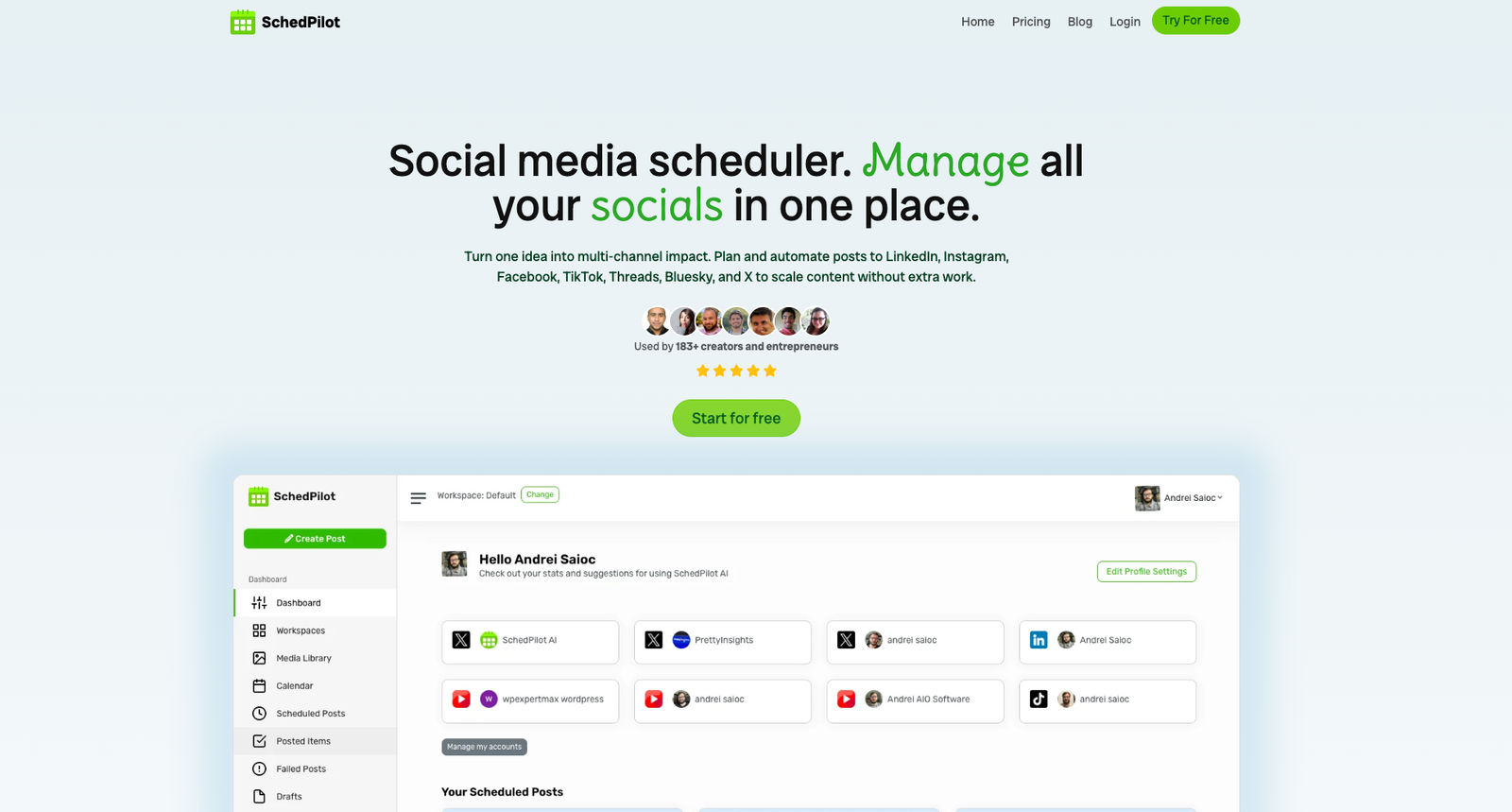
SchedPilot is my favorite control center for Instagram, because it mixes scheduling, ideation, and reporting in one place. You can plan feeds, stories, reels, and carousels, then let the app publish everything at the best times. The built in idea engine suggests hooks, captions, and content pillars so you never stare at a blinking cursor again. If you want ig tools like Buffer or Hootsuite but slimmer and more focused, SchedPilot deserves the first slot.
2. Meta Business Suite
Meta Business Suite is the free dashboard from Meta that connects Facebook pages and instagram accounts in one place. It lets you schedule posts and stories, check basic analytics, and respond to comments from a central inbox. I see it as a foundation, because many other instagram tools simply build extra features on top of what this offers.
3. Later
Later became popular with its neat visual planner that lets you drag and drop posts into a grid. You can preview how your feed will look before anything goes live, which really helps perfectionists sleep at night. It also offers simple analytics, saved captions, and hashtag suggestions, making it a flexible instagram tool for small teams. If you manage several brands, the media library and labeling features keep everything organized instead of living in random folders. The downside is that you might outgrow the basic analytics once you start treating instagram like a serious acquisition channel.
4. Planoly
Planoly focuses on visual planning and evergreen grids, which makes it attractive for brands that care about consistent aesthetics. You can schedule posts, manage comments, and save caption templates, all from a simple drag and drop dashboard. The hashtag manager helps you organize groups of tags for different content themes, which speeds up publishing a lot. I like it for boutique brands that want structure, but do not need heavy reporting or deep cross channel features.
5. Buffer
Buffer is one of the classic ig tools for scheduling across multiple platforms with a clean and distraction free interface. It lets you queue posts, analyze performance, and collaborate with team members through simple approval workflows. If you are just leaving manual posting behind, Buffer feels friendly, although power users might want richer instagram marketing tools later.
6. Hootsuite
Hootsuite is a veteran in the social media world, famous for supporting many networks and complex team setups. You can schedule posts, monitor comments, run basic listening, and generate reports that managers actually enjoy reading. For small creators it can feel heavy, but agencies often love having everything in one enterprise style dashboard. Treat it as a central control room when you manage many accounts, clients, and approval chains at the same time. If you prefer lightweight ig tools, keep reading, because the next picks might suit solo creators better.
7. Metricool
Metricool offers scheduling, ads analytics, and reporting in one dashboard that feels almost like a digital command center. You can see how instagram, TikTok, and other channels perform side by side, which helps with strategic decisions. The reporting templates are helpful for agencies that send regular updates to clients and hate making slides manually. If you love spreadsheets and charts, this instagram tool will probably make your inner data nerd very happy.
8. Sprout Social
Sprout Social is a premium platform with impressive reporting, team workflows, and customer support features built for larger organizations. It includes smart inboxes, listening features, and detailed instagram analytics that help you justify budget to leadership. If you run an agency or in house marketing team with many stakeholders, Sprout can become your reliable meeting friendly dashboard.
9. Loomly
Loomly combines a content calendar, asset library, and collaboration features that work nicely for creative teams. You can create flexible workflows from draft to approval, which keeps clients and managers aligned without endless chats. Its post idea suggestions surface seasonal moments and trends that you might otherwise forget in busy weeks. I like Loomly for teams that want a shared calendar that covers instagram and other platforms in one place. It feels somewhere between a scheduling tool and a light project management system for content heavy brands.
10. Sendible
Sendible is popular with agencies and freelancers because it supports many clients and offers custom reporting options. You get scheduling, social listening, and a central inbox for managing comments from instagram and other networks. Its white label style features are handy if you want to present reports under your own brand. For serious client work it can become the backbone of your reporting and community management workflow.
11. Pallyy
Pallyy aims to be a simple instagram first scheduler with clean visuals and easy client collaboration. You can create approval links for clients, manage comments, and analyze performance without a huge learning curve. If you want an affordable instagram marketing tool that still feels polished, Pallyy is worth a serious look.
12. SocialBee
SocialBee focuses on evergreen content categories, which makes it perfect for accounts that recycle posts over time. You create buckets for different themes, then fill them with posts that the tool rotates automatically. This approach is great for educational feeds, newsletters, or podcasts where older content remains valuable for new followers. The analytics are not as advanced as dedicated reporting suites, but they cover the basics comfortably. If your main headache is keeping the queue full, SocialBee can feel like a silent assistant that never complains.
13. Tailwind
Tailwind started with Pinterest scheduling, but its instagram features have grown a lot in recent years. You get smart scheduling, hashtag recommendations, and simple analytics bundled together. There is also a focus on small business templates and design help, which speeds up content creation. If you already use Tailwind for Pinterest, turning on instagram scheduling inside the same dashboard feels very convenient.
14. Iconosquare
Iconosquare is a specialist analytics platform with deep reporting across instagram and a few other networks. You get detailed graphs, benchmark comparisons, and competitor tracking, which is gold for serious strategists. If you love presenting data driven stories to clients or leadership, this tool turns messy numbers into clear visuals.
15. Flick
Flick built its reputation on hashtag research, but now includes scheduling and basic analytics too. You can discover relevant hashtags, analyze their performance, and save sets that you reuse on future posts. The interface feels friendly even if you dislike data, which helps creators who are more visual than analytical. Used wisely, hashtag insights can increase reach without turning your captions into unreadable walls of tags. I still recommend testing manually, but Flick makes that testing process way faster and much less painful.
16. Hashtagify
Hashtagify is another hashtag research tool that lets you explore popularity, trends, and related tags around a topic. You can check whether a tag is overcrowded, rising, or declining, then adjust your strategy accordingly. It is particularly useful when you enter new niches and want to understand how people categorize content there. Think of it as a map of conversations, helping your posts land in the right discovery clusters.
17. Ninjalitics
Ninjalitics gives detailed analytics for instagram profiles, including follower quality, growth trends, and content performance. You can analyze your own account or check competitors to see what works in your niche. I like running a quick scan before planning content, just to confirm that my creative ideas match real data.
18. Social Blade
Social Blade tracks follower counts and basic engagement metrics across platforms, including instagram and YouTube. It is handy when you want a quick health check on growth without logging into every account. You can also peek at other creators to see whether their growth is organic or suspiciously dramatic. I treat it as a top level pulse rather than a deep analytics tool, but it earns a spot. Sometimes you just need a fast outside view to confirm your feeling that a profile is stalling.
19. Brand24
Brand24 is a social listening platform that tracks mentions of your brand, competitors, and keywords across the web. It captures comments, reviews, and posts that mention you, including some instagram content, so you see the bigger picture. This helps with reputation management and influencer discovery, because you spot people talking about your niche. If you take brand sentiment seriously, a listening tool can be as important as your scheduler.
20. Mention
Mention is another listening focused platform that tracks brand and keyword mentions across social networks and the wider web. You can monitor how campaigns land, identify potential crises early, and spot collaboration opportunities with engaged fans. For brands that invest heavily in instagram, seeing the echo of each campaign outside the feed is incredibly valuable.
21. ManyChat
ManyChat helps you build automated chat flows that connect instagram direct messages with lead capture and email tools. You can create keyword triggers, simple quizzes, and follow up sequences that nurture people after they comment or message. This kind of automation turns casual engagement into owned contacts, which matters when algorithms change or accounts are restricted. Just do not turn everything into a robot, because people still appreciate honest human responses. Think of ManyChat as a helpful assistant that handles routine questions while you focus on real conversations.
22. MobileMonkey
MobileMonkey also offers chat automation that connects instagram, web chat, and other channels in one system. You can build funnels that answer common questions, collect emails, and route complex cases to humans. Used carefully, these flows reduce support workload without turning your account into a spam factory. My rule is simple, if the bot would annoy me as a user, I redesign the entire conversation.
23. Canva
Canva is the design toolbox that many instagram creators open before anything else each morning. You get templates for posts, stories, reels covers, and highlight icons, plus simple tools for resizing and branding. Even if you are not a designer, Canva makes your feed look polished enough that nobody suspects the truth.
24. Adobe Express
Adobe Express gives you professional grade templates and editing tools with a simpler interface than full desktop suites. You can quickly create animated stories, short promos, and branded graphics that match existing style guides. Because it connects with other Adobe products, teams can keep colors and fonts consistent across everything. If you already pay for Creative Cloud, integrating Adobe Express into your instagram workflow becomes a straightforward win. It feels like a bridge between professional design land and quick social content creation, which is exactly what many teams need.
25. CapCut
CapCut is a powerful mobile video editor that makes reels and short form videos look far more polished. You get transitions, effects, text overlays, and audio tools that rival some desktop editors. Because it runs on your phone, you can edit quickly while commuting or pretending to watch television. For creators who rely on reels, investing time in CapCut can raise perceived production value immediately.
26. InShot
InShot is another flexible mobile editor that handles trimming, speed changes, filters, and simple transitions for reels. The interface is straightforward, so you spend more time adjusting clips and less time learning complicated buttons. I like pairing InShot with a scheduler like SchedPilot so edited videos move straight into planned campaigns.
27. Snapseed
Snapseed is a photo editing app from Google that still delivers impressive power for free. You can fine tune exposure, color, and sharpness, or apply creative filters that give photos a unique mood. The selective adjustment tools let you fix only parts of an image, which feels almost magical on mobile. If your raw photos look flat, running them through Snapseed before posting can change results dramatically. Better pictures lead to better engagement, even if the strategy behind them stays exactly the same.
28. Linktree
Linktree solves the problem of that single link in your instagram bio by turning it into a mini hub. You can list products, articles, offers, and other destinations without constantly swapping links in and out. It also supports simple tracking, so you see which buttons people click after leaving your profile. If you sell anything or collect subscribers, a bio link tool sits near the top of the priority list.
29. Taplink
Taplink is another bio link solution that offers more design control, custom sections, and even basic lead forms. You can create mini landing pages with text, buttons, countdowns, and contact details, all optimized for mobile visitors. If Linktree ever feels too simple, Taplink gives extra freedom without requiring a full website builder.
30. Milkshake
Milkshake turns your bio link into a tiny website made from swipeable cards that look playful and modern. You can highlight offers, introduce yourself, share testimonials, or showcase content in a fun visual format. The setup takes only a few minutes, which is perfect if design is not your favorite task. I like it for creators, coaches, and small shops that want personality without hiring a designer. It proves that sometimes a simple instagram tool can make your brand feel surprisingly memorable.
31. Notion
Notion is not an instagram specific app, but it is amazing for planning content calendars and documenting experiments. You can store ideas, hooks, scripts, and creative briefs, then link them directly to scheduled posts. Many teams build entire social media playbooks inside Notion, so new members ramp up quickly. Treat it as the brain of your instagram strategy, while the other ig tools execute the actual moves.
Conclusion: build a smart stack then hit publish
You do not need all thirty one tools on this list to grow faster on instagram. Start by choosing a scheduler, a design app, an analytics helper, and maybe one automation tool. Once that small stack feels comfortable, you can gradually add new instagram tools to cover fresh needs.
For a simple starter combo, you could try something like this:
-
One scheduler for posts and stories
-
One design app for graphics and video covers
-
One analytics tool to track progress clearly
Remember that tools amplify your habits, so consistent posting and real connection still matter more than any fancy feature. Pick the best instagram tools that match your stage, then commit to showing up for at least a few months. If you keep testing, measuring, and refining, the combination of creativity and automation becomes very hard to compete with. Personally I would rather let ig tools handle busy work while I focus on ideas, offers, and fun experiments. If a tool saves you time and does not make you cry into your coffee, it is probably a keeper.