 SchedPilot
7 Best Tweet Schedulers in 2026, With the Prices They Charge Right Now
In March 2026, X quietly moved X Pro (the old TweetDeck) behind its $40-a-month Premium+ plan. Overnight, a lot of people who had been scheduling tweets for the price of a blue check went shopping for a new tweet scheduler. If that’s you, this list is for you.
We compared seven tools on the things that actually matter when you post to X every day: whether threads schedule reliably, what you pay once you add a second account, and whether the tool does anything beyond “pick a time.” Prices are what each company listed in October and November 2026. Yes, SchedPilot is our product and it’s first. We’ll tell you where the others beat it.
Most of these tools offer bulk tweet scheduler so its what you need
The short version
| Tool | Starts at | Free option | Best for |
|---|---|---|---|
| SchedPilot | $21/mo (yearly), $29 monthly | 7-day trial | Threads plus every other network, 5+ accounts |
| Typefully | Paid tiers vary | Free plan, 1 post queued | Writing threads |
| Hypefury | $6/mo for one channel | 7-day trial, no card | Autoplugs and recycling |
| Tweet Hunter | $29/mo | 7-day trial | Viral inspiration and auto-DMs |
| Buffer | $5 per channel/mo | Free: 3 channels, 10 posts each | Light, occasional posting |
| X’s own scheduler | Free (X Pro is $40/mo) | Yes | One account, a few tweets a week |
| Publer | Paid per account | Free plan, but no X | Teams already using it for other networks |
1. SchedPilot
SchedPilot’s tweet scheduler was built around the way people grow on X now, which is mostly threads. You write the whole thread in one editor (up to 25 tweets), see a preview that matches how it’ll look on X, attach media to any tweet in the chain, and it publishes in order at the time you set. Paste a long draft and it splits it into tweet-sized pieces.
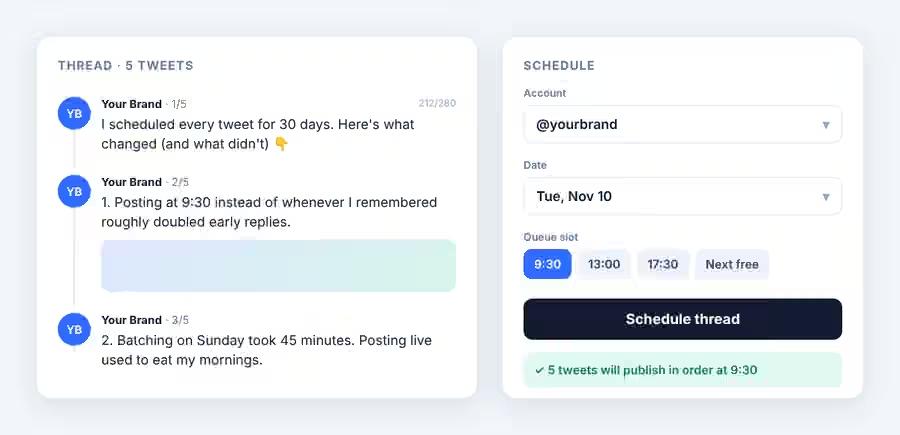
Around that sits the stuff you’d expect: queues with preset time slots, best-time suggestions based on your audience, evergreen recycling for your best tweets, drafts, a drag-and-drop calendar and per-tweet analytics. It publishes through the official X API.
Two things set it apart from the X-only tools on this list. First, the same post can go to LinkedIn, Threads, Bluesky, Instagram, TikTok, YouTube, Pinterest, Facebook and Reddit without copy-pasting. Second, it ships an MCP server and a REST API, so you can schedule from Claude, ChatGPT, Cursor or an n8n workflow. If you already draft tweets with an AI assistant, being able to say “queue these five for next week at 9:30” and have it happen is a real time saver. (We wrote up how to schedule tweets with ChatGPT if you want to see it.)
Pricing: Silver is $29 a month, or $21 a month billed yearly, for 5 accounts and 450 posts a month. Gold ($39 monthly, $35 yearly) gives 20 accounts, unlimited posts and AI writing features. Every plan has a 7-day free trial; you add a card but aren’t charged during it.
Where it falls short: there’s no free-forever plan, the mobile app isn’t out yet (the web app works in a phone browser), and the team approval workflow sits on the Enterprise plan. If you only ever post to X and want the most polished writing experience, Typefully is still the nicer editor.
2. Typefully
Typefully is the best place on this list to actually write. The editor is calm and fast, threads are first-class, and it handles long posts and cross-posting to LinkedIn and Threads. Its analytics are clean and easy to read. A lot of writers use it as a drafting tool even when they schedule elsewhere.
The free plan is real but tight: one connected account and one scheduled post in the queue at a time, which makes it a trial more than a workflow. Paid plans (Starter, Creator and Team) unlock the queue, AI help and collaboration. Typefully’s pricing page renders in the browser and third-party write-ups quote different numbers, so check the current figures on their site before you budget.
Pick it if writing quality is your bottleneck. Skip it if you need Instagram, TikTok or YouTube in the same calendar.
3. Hypefury
Hypefury is built for growth mechanics. Its signature feature is autoplugs: when a tweet crosses an engagement threshold, Hypefury replies to it with a plug for your newsletter or product. It also has an engagement builder that watches chosen accounts and keywords so you can reply quickly, plus Tweetshots for turning tweets into images.
The pricing is unusual and pretty friendly. The Flexible plan is $6 a month for one channel, with each extra platform another $6. The Full plan is $19 a month and includes all channels (Bluesky, Threads, LinkedIn, Instagram, TikTok), cross-posting and AI trained on your posts. Both come with a 7-day trial and no card required. The free plan is gone.
Our take: great if you sell something and want every viral tweet to work for you. Overkill if you just want a queue.
4. Tweet Hunter
Tweet Hunter is less a scheduler and more an X growth suite that happens to schedule. You get a library of 12 million-plus viral tweets for inspiration, thread scheduling, evergreen tweets, auto-retweets and auto-plugs. The Grow plan adds an AI writer and an X CRM that lets you build lists of accounts and engage with them, which is useful for founders doing outreach.
Discover is $29 a month for one X account, Grow is $49 for five, and Enterprise is $199. That’s a lot for scheduling alone, and the auto-DM features (up to 15,000 a month on Enterprise) are the kind of automation you should use carefully if you care about your account’s reputation. Worth it for people who treat X as a sales channel. Not for anyone else.
5. Buffer
Buffer is the safe, simple choice, and its free plan is still one of the better ones: three channels and up to 10 scheduled posts per channel. X is supported on both free and Premium profiles. Paid plans are priced per channel: Essentials at $5 a month per channel and Team at $10.
The per-channel model is fine for one or two accounts and gets expensive as you add more. Buffer is also general-purpose, so it doesn’t go deep on X-specific things like thread previews or growth automations. If you’re weighing the two, our Buffer vs SchedPilot comparison goes feature by feature.

6. X’s built-in scheduler (and X Pro)
Don’t forget the free option. Many accounts can schedule a post straight from the x.com composer by clicking the calendar icon, and scheduled posts live under Unsent posts. It costs nothing. It also has no queue, no calendar view and no multi-account support, and thread scheduling there is unreliable.
X Pro, the multi-column dashboard that does support scheduled threads and polls, now needs Premium+ at $40 a month (or $33 a month billed yearly) since March 26, 2026. It used to come with the $8 Premium plan. At $40 for one network, almost every tool above is better value. We walk through the free route step by step in our tweet scheduler free guide.
7. Publer
Publer is a capable all-network scheduler with a generous free plan, but read the fine print: X can’t be connected on the free tier. X support, including scheduling threads and comments, starts on the Professional plan because of X’s API costs, and pricing is per social account. If your team already runs Instagram and LinkedIn through Publer, adding X there is reasonable. If X is your main channel, the tools higher on this list are a better fit.

How to pick
Start with how many accounts and networks you post to, because that’s what drives the price. One X account and a few tweets a week? Use X’s free scheduler or Buffer’s free plan and don’t pay anyone. One X account where you post threads daily? Typefully or SchedPilot. Several accounts, or X plus LinkedIn, Threads and Instagram? SchedPilot’s flat pricing across 5 or 20 accounts usually works out cheaper than paying per channel.
Then check two things during the trial. Schedule a five-tweet thread with an image in tweet three and see if it publishes correctly. And look at the analytics after a week: if a tool can’t tell you which of your scheduled tweets did well, you’ll end up guessing at your time slots forever. Our roundup of Twitter analytics tools covers that side in more depth.
Whichever you choose, the habit matters more than the tool. Three fixed slots a day, filled once a week, beats the fanciest scheduler you open twice a month.
Related posts
Tweet Scheduler Free: How to Schedule Tweets on X Without Paying (2026)
November 1, 2026
Best Twitter (X) Analytics Tools in 2026 (Tested & Compared)
July 5, 2026
How to Make Money on Twitter (X) in 2026: 11 Proven Ways
June 20, 2026
How to Make Your Twitter (X) Account Public — In Under 30 Seconds
April 17, 2026