 SchedPilot
10 Best Instagram Management Apps in 2026, With the Prices They Charge Now
Running one Instagram account by hand is fine. Running four is when the phone starts eating your evenings: a Reel that has to go out at 6 pm, forty comments waiting, and a client asking for last month’s numbers. An Instagram management app puts the posting, the replies and the reporting in one place. The right one costs less per month than an hour of your time.
We compared ten of them on the jobs that actually make up Instagram management: publishing every format (posts, carousels, Reels, Stories), handling comments and DMs, reporting, and working with a team or clients.
Yes, SchedPilot is our product and it’s first. Every section, ours included, says who should skip the tool.
Access the complete list of management apps for instagram down below:
Try SchedPilot for free
Free trial · No upfront payment · 10+ platforms
Post on 10 platforms at once. Great for influencers, marketers, agencies.
The short answer
SchedPilot is the best Instagram management app for most people running three or more accounts, because it charges a flat price per plan instead of per channel or per seat. If you run one account and don’t want to pay anything, Meta Business Suite covers the basics for free. Agencies that send clients white-label reports should look at SocialPilot, and brands where Instagram is a customer service channel should look at Sprout Social.
- SchedPilot: flat pricing from $21/mo for 5 accounts, plus AI agents that draft and queue your posts
- Meta Business Suite: free, Instagram and Facebook only
- Buffer: $5 per channel, with a free plan for 3 channels
- Later: visual planner and link in bio from $18.75/mo
- Metricool: free plan with an inbox and competitor tracking, paid from $20/mo
- Planoly: grid planning and auto-DMs for creators from $14/mo
- SocialPilot: client approvals and white-label reports from $25.50/mo
- Iconosquare: the deepest Instagram analytics, from $33/mo
- Hootsuite: listening and big-team workflows from $99 per user
- Sprout Social: a customer-care inbox from $79 per seat
Prices are the yearly-billing rates from each pricing page, checked in November 2026.
We only included apps that publish through Meta’s official Instagram API for business and creator accounts. Anything that asks for your Instagram password or sells follow/unfollow automation is out, since that’s how accounts get flagged. Then we priced each one for a realistic setup: three to five Instagram accounts and one or two people.

Instagram management apps compared
| App | Starts at | Free option | Comment and DM replies from | Best for |
|---|---|---|---|---|
| SchedPilot | $21/mo yearly, $29 monthly (5 accounts) | 7-day trial, card required, $0 charged | Gold, $35/mo yearly | Several accounts on one flat price, AI agents |
| Meta Business Suite | Free | Free | Free | One business, Instagram and Facebook only |
| Buffer | $5 per channel/mo yearly | Free: 3 channels, 10 queued posts each | Free (comments) | 1 to 3 accounts, a simple queue |
| Later | $18.75/mo yearly | 14-day trial | Growth, $37.50/mo yearly | Visual planning and link in bio |
| Metricool | $20/mo yearly, $25 monthly (up to 5 brands) | Free: 1 brand, 20 posts a month | Free | Analytics and competitors on a budget |
| Planoly | $14/mo | Free mobile plan, 10 uploads a month | Auto-DMs on every paid plan | Creators who plan their grid |
| SocialPilot | $25.50/mo yearly, $30 monthly (7 accounts) | 14-day trial, no card | Standard, $42.50/mo yearly | Agencies with client approvals |
| Iconosquare | $33/mo yearly (5 profiles) | Free tier after trial: 2 profiles | Scale, $69/mo yearly (DMs) | Deep Instagram analytics |
| Hootsuite | $99 per user/mo yearly | 14-day trial | Standard | Larger teams that need listening |
| Sprout Social | $79 per seat/mo yearly | 30-day trial, no card | Standard, $199 per seat | Customer-care teams |
1. SchedPilot
Best for: anyone running three or more Instagram accounts who doesn’t want the bill to grow with every account or teammate.
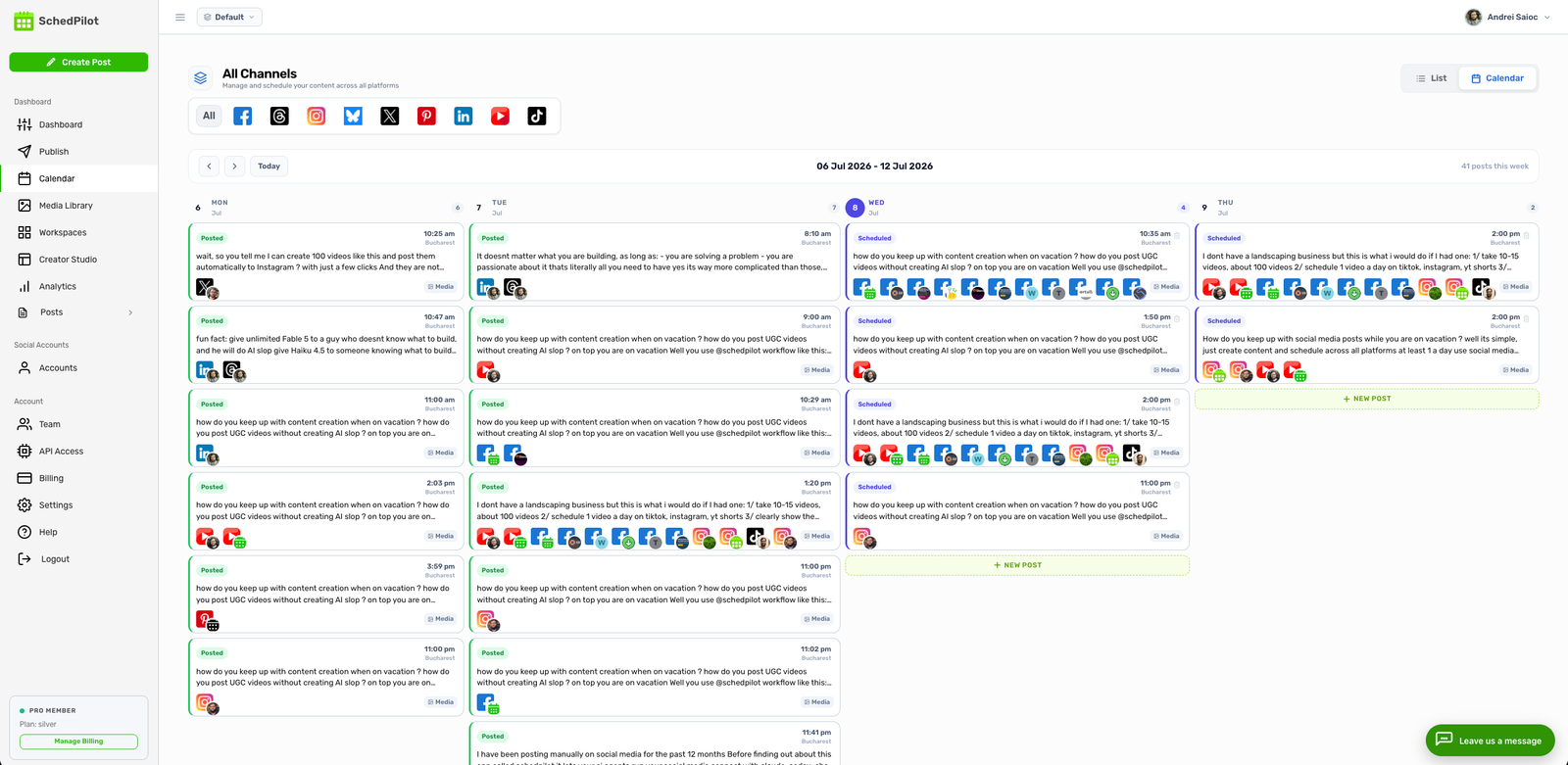
SchedPilot’s Instagram scheduler handles every format Instagram’s API allows: single images, carousels of up to 10 images, Reels and Stories. Most of it auto-publishes. For the few Story formats Instagram still makes you post by hand, it sends a notification at the time you picked, so the Story is ready to go with one tap. Hashtags can go in an automatic first comment, and you can save hashtag sets per niche or per client. The visual feed planner shows your upcoming grid before anything goes live, and best-time suggestions come from your own audience data rather than an industry average.
The part we’re proudest of is the AI side. SchedPilot has an MCP server and a REST API, so Claude, ChatGPT, Cursor or an n8n workflow can draft and schedule posts for you. Type “plan five Reels for next week at 6 pm” into Claude and the posts land in your SchedPilot calendar, where you check them before they publish. If you already write captions with an AI assistant, this kills the copy-paste step. Here’s how the MCP social media scheduler works in practice.
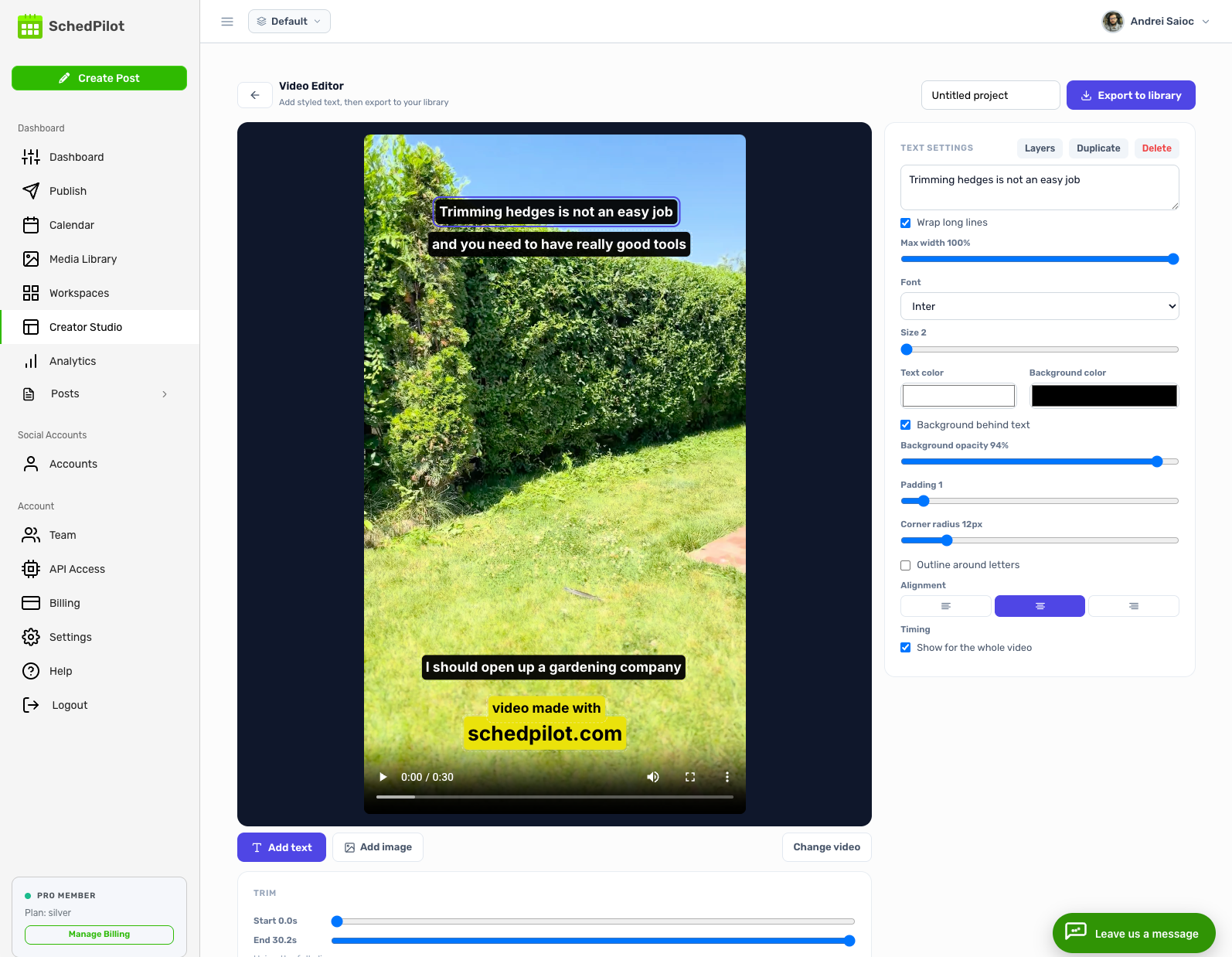
There’s also a built-in video editor for adding captions and text hooks to short clips, which saves a round-trip through a separate editor for every Reel. And the same post can go to TikTok, YouTube Shorts, LinkedIn, X, Threads, Facebook, Pinterest and Bluesky, so it’s 9 networks from one calendar.
Pricing: Silver is $29 a month, or $21 a month billed yearly, for 5 accounts and 450 posts a month. Gold ($39 monthly, $35 yearly) gets you 20 accounts, unlimited posts, replies to comments and AI-written posts. Platinum is $59 ($49 yearly) for 40 accounts, and Enterprise is $99 ($79 yearly) for 100 accounts, 10 team seats and a post approval workflow. Every plan has a 7-day free trial: you add a card, but you’re charged $0 until it ends. Full details are on the pricing page.
Where it falls short: there’s no free-forever plan, there’s no native mobile app yet (the web app works in a phone browser), and approvals only come with Enterprise. If a client has to sign off on every post and you only manage five accounts, that’s a lot of plan for one feature; Later or SocialPilot get you approvals for less. Comment replies also start on Gold, not Silver. Our Buffer vs SchedPilot comparison goes feature by feature.
2. Meta Business Suite
Best for: one business with one Instagram account and a Facebook Page, and no budget.

Meta Business Suite is Meta’s own free dashboard, on desktop and in the app. You can schedule Instagram posts, carousels, Reels and Stories, answer Instagram comments and DMs in the same inbox as your Facebook messages, and read Insights on reach and follower growth. For a cafe or a solo coach, that’s most of the job, at no cost.
It stops being enough quickly. It only covers Instagram and Facebook, there’s no visual grid planner, no approval flow, and running several businesses means hopping between portfolios. When scheduled posts misbehave, our guide to Instagram scheduled posts not working covers the usual causes. One account: use it. Three accounts: you’ll want a real tool.
3. Buffer
Best for: one to three accounts and a simple queue.
Buffer‘s free plan is still one of the most usable: 3 channels, 10 scheduled posts per channel at a time (a slot frees up once a post publishes), comment replies and 30 days of insights. Paid plans are priced per channel. Essentials is $5 a month per channel billed yearly and adds unlimited scheduled posts, first-comment scheduling, a hashtag manager and full analytics. Team is $10 per channel and adds unlimited users and approval workflows. There’s a 14-day trial.
Per-channel pricing is lovely at two accounts and steep at fifteen. Fifteen channels on Team comes to roughly $150 a month (Buffer discounts channels above 10, so a bit less). Auto-publishing only works for Instagram business and creator accounts; personal profiles get reminders. The fine print is in our Buffer free account breakdown.
4. Later
Best for: brands and creators who plan Instagram visually and sell through their link in bio.

Later began as an Instagram planner, and it shows. The drag-and-drop visual planner, Link in Bio pages, Instagram first comment, hashtag suggestions and personalized best times for Feed, Reels and Stories are all on the cheapest plan. Starter is $18.75 a month billed yearly for one social set (one profile on each of 8 networks) and one user.
The catch is the caps. Starter allows 30 posts per profile per month, which is one a day. The social inbox for Instagram DMs, comments and mentions, plus approvals, only arrives on Growth at $37.50 a month billed yearly, along with 180 posts per profile. If you’d rather post Stories natively with music and stickers, Later can send a notification instead of auto-publishing. Cheaper options are in our list of Later alternatives.
5. Metricool
Best for: small teams who care most about numbers and competitors.
Metricool‘s free plan is the most generous here for analytics: 1 brand (one profile per network), 20 scheduled posts a month, an inbox that includes Instagram, 5 competitor profiles and 30 days of data. Starter is $20 a month billed yearly ($25 monthly) for up to 5 brands, with unlimited posting, 100 competitors, PDF reports and unlimited history. It also has an MCP connector for Claude and ChatGPT.
Team features are the weak spot. Roles, client access and the post approval system need the Advanced plan, from $53 a month billed yearly for 15 brands. Comment-to-DM automations are a separate Flows add-on ($12 for 2,500 runs a month). If reporting is the main job, it’s excellent value. More in Metricool alternatives.
6. Planoly
Best for: solo creators who plan their grid and sell from their bio.
Planoly calls itself the inventor of grid planning, and that’s still its strength. Every paid plan includes the visual planner, auto-posting where Instagram allows it (with push reminders to post natively when it doesn’t), a media library, a link-in-bio storefront for digital products and automated Instagram DMs. Starter is $14 a month for one social set and one user, Growth is $24 for two of each, and Pro is $47 for six. There’s a 14-day trial and a free mobile plan capped at 10 uploads a month.
We wouldn’t pick it for client reporting or team approvals. It’s built for one creator running their own brand, and it’s good at that.
7. SocialPilot
Best for: agencies that report to clients.
SocialPilot schedules Instagram posts, carousels, Reels and Stories with first comments, and its agency features are what you’re really paying for: client approval workflows, unlimited client seats and white-label PDF reports. Those live on Premium, at $85 a month billed yearly ($100 monthly) for 25 accounts and 6 users. Trials run 14 days with no card.
Watch the bottom plan. Essentials ($25.50 yearly, $30 monthly) gives 7 accounts and 1 user, but comment replies and detailed analytics start on Standard at $42.50 a month billed yearly. We compared it in SocialPilot alternatives.
8. Iconosquare
Best for: brands that have to explain Instagram performance to a boss.
Iconosquare is analytics first. You get Reels analytics, Story analytics with exits and completion rates, tag and mention tracking, campaign tracking by hashtag or label, and reports delivered on a schedule. Launch is $33 a month billed yearly for 5 profiles, 1 user and 100 posts a month. Instagram DM management, competitor and hashtag tracking, and approvals arrive on Scale at $69 a month billed yearly, with 3 users. The 14-day trial needs no card, and afterwards there’s a free tier with 2 profiles and 10 posts per profile.

The downside is paying for depth a solo creator won’t read. Our Instagram analytics tools comparison has cheaper picks.
9. Hootsuite
Best for: marketing teams of five or more who also need social listening.
Hootsuite‘s Standard plan ($99 per user a month, billed yearly) covers 10 social accounts, unlimited scheduling, a unified inbox, AI post generation, and brand and competitor monitoring. Professional ($199 per user) unlocks unlimited accounts and automated inbox replies, and content approvals sit on Advanced at $399 per user. The 14-day trial caps daily posting and blocks bulk scheduling, so test with a light week.
For small teams the math rarely works. Three people on Professional is $597 a month. If listening isn’t on your list, see Hootsuite alternatives.
10. Sprout Social
Best for: brands where Instagram is a customer service channel.
Sprout Social‘s Smart Inbox is still the best place to work through a heavy load of comments and DMs, with tagging, filters and review management alongside. The newer Essentials plan costs $79 per seat a month billed yearly ($99 monthly) for 5 profiles and focuses on publishing and reporting. The consolidated inbox is listed from Standard, at $199 per seat. The 30-day trial needs no card.
Per-seat pricing makes it an enterprise tool. If you’re one person with five accounts, every other app on this list costs less. More options in Sprout Social alternatives.
How to choose an Instagram management app
Start with the pricing model, not the feature list. Nearly every app here schedules Reels and carousels; what changes is the bill as you add accounts and people. Per-channel pricing (Buffer) is the cheapest way to run one to three accounts. Per-seat pricing (Hootsuite, Sprout Social) is the wrong model for a freelancer or a three-person team, and only makes sense when salaries already dwarf software costs. Flat plans by account count (SchedPilot, SocialPilot, and Metricool by brand) usually win for small agencies.
Then check the things that cause the most pain later:
- Stories. Ask whether the app auto-publishes the Story formats you use or sends a reminder. Some Story features, like interactive stickers, still aren’t available through Instagram’s API, so every tool here falls back to a notification sometimes.
- Where comments and DMs live. If replying is half your job, make sure the inbox is on the plan you’re buying, not the next one up. Later, SocialPilot, Iconosquare, Sprout Social and SchedPilot all put it above their entry plan.
- Approvals. Clients who sign off on posts need an approval flow, and it’s often the feature that pushes you up a tier.
- Account type. Auto-publishing needs an Instagram business or creator account. Switching takes a minute in Instagram’s settings.
Use the trial on a real week. Schedule a carousel with a first comment, a Reel and a Story, then check that all three went out on time and looked right. If you’re juggling several brands, our guide to managing multiple social media accounts covers the workflow side, and best times to post on Instagram helps you fill the calendar once it’s set up.
If you want one app for several Instagram accounts that an AI assistant can also post through, try SchedPilot’s Instagram scheduler free for 7 days.
FAQ
What is an Instagram management app?
It’s software that handles the daily work of running an Instagram account from one place: scheduling posts, Reels and Stories, replying to comments and DMs, and tracking results. Most of them manage other networks too.
Is there a free Instagram management app?
Yes. Meta Business Suite is free for Instagram and Facebook. Buffer’s free plan covers 3 channels with 10 queued posts each, and Metricool’s free plan covers 1 brand with 20 posts a month plus an inbox.
Can an app post Instagram Stories automatically?
Mostly. Apps that use Meta’s official API can auto-publish standard Stories. Some features, such as interactive stickers, aren’t available through the API, so those apps send you a reminder to finish the Story in Instagram.
Will posting through an app hurt my reach?
Not if the app publishes through Meta’s official Instagram API. Avoid any tool that asks for your Instagram password. We looked at this for Reels in does scheduling Reels affect views on Instagram.
Do I need an Instagram business account?
For auto-publishing, you need a business or creator account. Personal profiles only get reminder notifications in apps like Buffer.
Related posts
How to Earn Money From Instagram Reels in 2026, With the Follower Count Each Method Needs
November 8, 2026
Instagram Engagement Rate in 2026: The Formula, What’s Good, and Benchmarks by Industry
November 8, 2026
Instagram Scheduled Posts Not Working? 9 Fixes, Sorted by What Went Wrong
November 1, 2026
Does scheduling reels affect views on Instagram?
October 13, 2026