 SchedPilot
How to Do Affiliate Marketing With YouTube Shorts (2026)
To do affiliate marketing with YouTube Shorts, pick a handful of products you’d recommend anyway, join an affiliate program, and make 20 to 45 second Shorts that show each product doing its job. The catch is that a URL typed into a Short’s description or comments isn’t clickable, so the link has to live in a product tag, on your channel profile, or in a longer video the Short points to. Then post the same Short to TikTok, Instagram, X and Pinterest, because one clip can earn on all five.
- Pick a narrow niche and 3 to 5 products you actually use.
- Join a program: YouTube Shopping affiliate if you qualify, otherwise Amazon Associates, a brand’s own program or a software program.
- Put the link where it clicks: a product tag, your channel profile links, or a related video whose description holds the links.
- Film short demos that show the product working in the first two seconds, and say it’s an affiliate link.
- Post each Short everywhere with SchedPilot: one upload goes to YouTube, TikTok, Instagram, X and Pinterest, by hand, from an AI agent over MCP, or from an n8n workflow.
- Track sales per platform and keep making Shorts about whatever sells.
Do You Want to Grow Your Social Media Faster?
Post to 10+ platforms at once — Instagram, TikTok, Facebook, X, LinkedIn and more. Built for influencers, marketers and agencies.
- 🚀 Schedule to all platforms at once
- 🤖 Let AI Agents write your posts for you
- 📈 Watch your engagement skyrocket
- 🎁 Completely free to start
Start for $0
Which affiliate program to join
The YouTube Shopping affiliate program is the only way to put a tappable product link on the Short itself. You tag the product during upload and a product sticker appears on the video. You need to be in the YouTube Partner Program, and in the countries where Shopping affiliate is open, YouTube has lowered the floor to 500 subscribers. Open YouTube Studio and look at the Earn tab to see whether it’s switched on for your channel.
Not there yet? Amazon Associates covers almost anything physical, but the cut per sale is small. Most direct-to-consumer brands run their own programs (often through Impact or ShareASale) and pay more. Software pays best, because many tools pay a recurring commission for as long as the customer stays.
For a new channel, that difference matters more than follower count. A 30% recurring cut on a $30 a month tool is $9 every month. A 3% cut on a $25 desk lamp is 75 cents, once. If your niche touches creators or marketers, SchedPilot has its own affiliate program worth a look.
Where the affiliate link goes on a Short

Since August 2023, YouTube shows URLs in Shorts descriptions and Shorts comments as plain text, to cut down on spam. Pasting your Amazon link under a Short does almost nothing, since very few people retype a URL.
Three spots still click. Product tags work if you’re in the Shopping affiliate program. The links on your channel profile, shown next to the Subscribe button, work for everyone, so point one at a simple page that lists your current picks. And every Short can carry one related video link, set in YouTube Studio on desktop, that sends viewers to another video on your channel.
That related video link is the one most affiliate channels skip. Make one longer review of the product (5 to 8 minutes is plenty), put the affiliate links in its description where they do click, and link every Short about that product to it. The Short does the reach, the long video does the selling, and the long video also earns more per view. Here’s how to schedule YouTube Shorts if you’re queuing a batch.
The other networks each have their own spot. On TikTok and Instagram the link lives in your bio (Instagram allows up to five bio links). On X, links in posts are clickable, so the cleanest setup is the clip as the post and the link as a reply under it. Pinterest is the friendliest of the five, because a Pin can carry a destination link of its own.
What to film so the Short sells
Show the product working in the first two seconds. A lamp switching on over a messy desk, a cable organizer swallowing six cords, the before and after of a cleaning spray. Talking about a product sells worse than showing it.
Formats that keep working: “3 under $40, tested,” one problem and the product that fixed it, a mistake people make with a tool and the one setting that solves it, and honest “I returned this one” Shorts, which build the trust that makes the next recommendation sell. Shorts can now run up to three minutes (more on Shorts length), but product demos land best between 20 and 45 seconds. If you already have long reviews, cut them into clips instead of filming from scratch; repurposing YouTube videos into Shorts walks through it.
Say it’s an affiliate link, on screen or out loud, and again in the caption. In the US the FTC expects a clear disclosure, and viewers forgive a recommendation far more easily than a hidden one. If a brand also paid you to feature the product, tick the paid promotion box in YouTube Studio too.
Post one Short to TikTok, Instagram, X and Pinterest at once
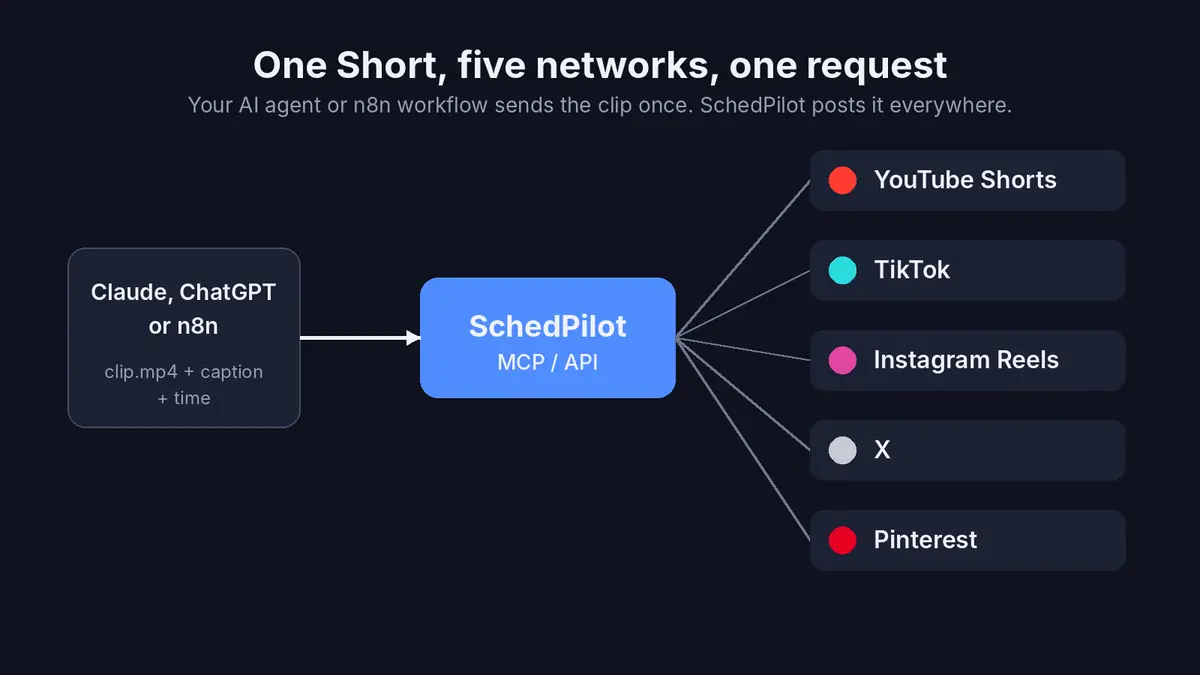
You can’t predict which platform a product clip will take off on. A Short that stalls at 800 views on YouTube can do 40,000 on TikTok, or the other way round. Posting to all five costs almost nothing once it’s automated, and it multiplies your chances of a clip that sells. SchedPilot connects your YouTube, TikTok, Instagram, X and Pinterest accounts once, and every post after that is one upload.
From an AI agent, with the SchedPilot MCP server
SchedPilot ships an MCP server, so Claude, ChatGPT or any other agent that speaks MCP can upload and schedule for you. Add it as a connector with the URL https://api.schedpilot.com/mcp, sign in, and paste a prompt like this:
Use SchedPilot. Timezone: America/New_York.

1. Call get_accounts. Use my YouTube, TikTok, Instagram,
   X and Pinterest accounts.
2. Upload this clip with upload_media:
   [direct link to the MP4]
3. Schedule it for tomorrow at 18:00 to all five accounts.
   Caption: one line on the problem the product fixes,
   then "affiliate link in profile" and 2 hashtags.
   YouTube title: under 70 characters, phrased as the result.
   On X, add a reply: "The one I use (affiliate link): [your link]"
4. Show me the scheduled post and its date.
For a batch, paste seven clip links and ask for one a day at 18:00. The agent uploads each file, writes a caption per clip and hands back a table of dates. The X reply only goes to X; the other networks ignore it. Connecting Claude to social media covers the setup screen by screen.
From an n8n workflow
If you’d rather not chat with an agent every week, let n8n do it. The workflow is three HTTP Request nodes: download the clip, upload it to SchedPilot, then schedule it with all five accounts in the accounts array. Trigger it from a Google Drive folder called “ready” and every Short you drop in goes out to five networks on its own. The n8n TikTok auto post workflow is ready to import (add your other four accounts to the last node), and n8n social media automation shows the multi-network version with AI-written captions. There’s also an n8n setup page.
By hand
In the SchedPilot app, upload the clip, tick the five accounts, add the YouTube title and pick a time. Posting to all social media at once shows the screen. Whichever route you use, export the clip without a TikTok or YouTube watermark, keep it vertical at 1080 by 1920, and post one Short a day rather than five on Sunday. The best time to post on YouTube for Shorts is a decent default for the others too.
Track what sells, drop what doesn’t
Most affiliate programs let you create separate tracking IDs or sub-IDs. Make one per platform, so the link in your TikTok bio and the one under your long YouTube review report separately. Without that you’ll know a lamp sold, but not whether YouTube or TikTok sold it.
Expect most Shorts to earn nothing. A few will carry the whole month. After 30 Shorts, look at which products and which formats produced sales, make five more Shorts about the winners, and stop filming the rest. Shorts ad revenue is small (here’s what YouTube pays per 1,000 views), which is exactly why the affiliate link does the heavy lifting on a Shorts channel.
YouTube Shorts affiliate marketing FAQ
Can you put affiliate links in YouTube Shorts?
Yes, but not as clickable text in the description or comments. Use YouTube Shopping product tags if you qualify, your channel profile links, or the related video link pointing to a longer video with links in its description.
How many subscribers do you need?
None for Amazon Associates or most brand programs. For YouTube’s own Shopping affiliate program you need to be in the Partner Program, with at least 500 subscribers in the countries where it’s offered.
Can I post the same Short on TikTok and Instagram?
Yes, as long as there’s no other platform’s watermark on it. One SchedPilot post can send the same clip to YouTube, TikTok, Instagram, X and Pinterest, with a separate title for YouTube.
Do I need to show my face?
No. Hands-and-product demos and screen recordings work well for affiliate Shorts, especially for tools, gadgets and software.
Ready to put every Short on five networks? Start SchedPilot for $0, connect YouTube, TikTok, Instagram, X and Pinterest, and schedule your first week. The trial lasts 7 days, a card is required, and nothing is charged if you cancel before it ends. Plans start at $29 a month, or $21 a month billed yearly (see pricing).
Related posts
10 Best Social Media APIs in 2026, Compared on What You’ll Actually Pay
November 24, 2026
How to Connect LinkedIn to ChatGPT: Post, Schedule and Make Carousels (2026)
November 23, 2026
Can ChatGPT Post to Social Media? What Actually Works in 2026
November 23, 2026
Zapier Social Media Automation: Schedule Posts to 9 Networks From One Zap
November 22, 2026