 SchedPilot
Buffer Pricing in 2026: What You’ll Actually Pay at 1, 5, 10, 25 and 50 Channels
TL;DR
- Free: $0 for up to 3 channels, 10 queued posts per channel, 1 user.
- Essentials: $6 per channel a month, or $5 on yearly billing. 1 user, unlimited posts, full analytics.
- Team: $12 per channel a month, or $10 yearly. Unlimited users, approvals, branded reports.
- Volume discount: every channel after the 10th costs less ($4, then $3, then $1 or $2).
- Verdict: Buffer is one of the cheapest schedulers for 1 to 6 accounts. From about 8 accounts up, a flat-priced tool costs less. At 100 accounts Buffer is $245 to $355 a month; SchedPilot is $99.
Buffer pricing starts at $0 and charges by channel after that. A channel is one connected social account, so an Instagram account and a Facebook Page count as two. Essentials costs $6 per channel per month ($5 if you pay yearly) and Team costs $12 ($10 yearly). Five channels on Essentials is $30 a month. Twenty is $100.
That per-channel model is the whole story. It makes Buffer very cheap when you run two or three accounts, and it makes the bill climb with every account you add. Below is what you’ll pay at every common channel count, what each plan includes, the fine print, and the point where a flat price wins. If you already know Buffer is too expensive for you, jump to our comparison of Buffer alternatives.
If you are interested in getting a better pricing for social media management tools especially when you run an agency check schedpilot pricing. We offer 100 accounts with unlimited posts for just under $100.
We make SchedPilot, a flat-priced scheduler, so keep that in mind. Every Buffer number here comes from Buffer’s pricing page and help center, checked on 13 November 2026, and we say plainly where Buffer is the better deal.
Try SchedPilot for free
Free trial · No upfront payment · 10+ platforms
Post on 10 platforms at once. Great for influencers, marketers, agencies.
Buffer pricing at a glance
| Free | Essentials | Team | |
|---|---|---|---|
| Price per channel, monthly billing | $0 | $6 | $12 |
| Price per channel, yearly billing | $0 | $5 ($60/yr) | $10 ($120/yr) |
| Channels | Up to 3 | Pay per channel | Pay per channel |
| Users | 1 | 1 | Unlimited |
| Scheduled posts per channel | 10 in the queue | Unlimited (5,000 fair-use cap) | Unlimited (5,000 fair-use cap) |
| Ideas | 100 | Unlimited | Unlimited |
| Analytics history | 30 days | Unlimited, plus reports | Unlimited, plus branded reports |
| Approval workflows | No | No | Yes |
| API keys | 1 | 3 | 5 |
| Free trial | n/a | 14 days | 14 days |
All three plans include the AI Assistant, the queue and calendar, the browser extension, link shortening, the community inbox and email support.
How Buffer’s per-channel pricing works
Short answer: you pay for every social account you connect, and the price per account drops once you pass 10.
Buffer counts each connected profile, page or account as one channel. It doesn’t matter whether those accounts belong to one brand or fifteen clients. Thirty channels cost the same either way.
The rate isn’t flat across all your channels. Buffer splits them into bands, and each band has its own price:
| Channels | Essentials (per channel / month) | Team (per channel / month) |
|---|---|---|
| 1 to 10 | $6 | $12 |
| 11 to 25 | $4 | $4 |
| 26 to 50 | $3 | $3 |
| 51 and up | $1 | $2 |
These are monthly-billing rates. Yearly billing takes about a sixth off each band.
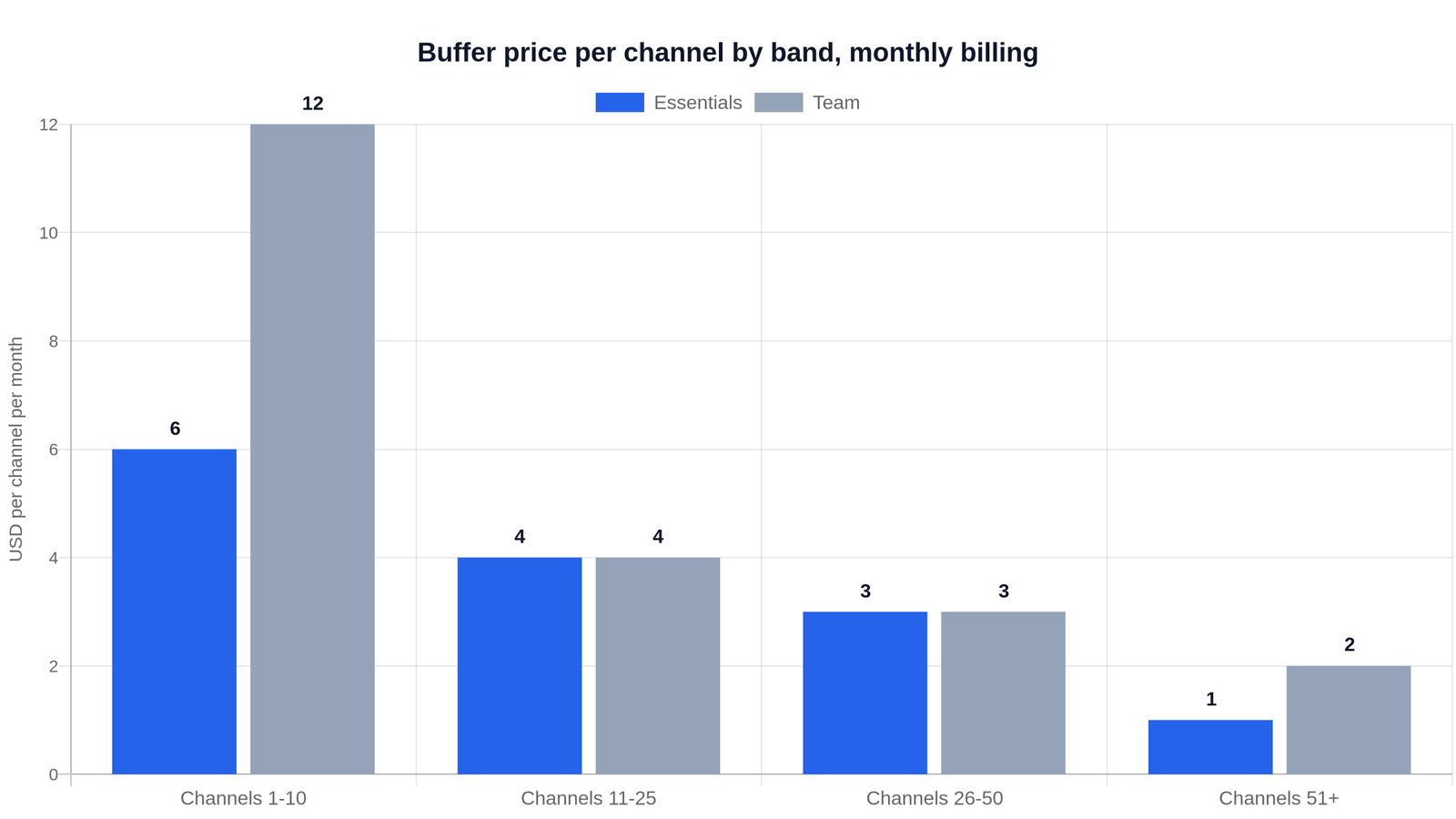
Buffer’s monthly price for each extra channel in a band. Channel 11 costs $4, not $6.
So 12 channels on Essentials isn’t 12 × $6. It’s 10 × $6 plus 2 × $4, which is $68 a month.
Two rules catch people out:
- Upgrading bills every channel, including the free ones. If you have 3 channels on Free and add a fourth on Essentials, you pay for all four.
- Every account counts, even quiet ones. A LinkedIn Page you post to once a month costs the same as an Instagram account you post to daily.
What the Buffer free plan includes, and where it stops
The free plan is real and has no time limit. You get 3 channels, 10 scheduled posts per channel, 100 ideas, 1 user, 30 days of analytics, the AI Assistant and 5 AI reply suggestions a week. You also get 1 API key with 1,000 requests per channel a month, capped at 3,000.
The 10-post limit counts posts waiting in the queue, not posts per month. A slot opens each time a post goes out. At three posts a day on one channel, you’re back in Buffer every three days to refill it.
There’s also a lifetime cap on connections. Buffer’s help center says free accounts can connect 8 channels per social network over the life of the account, including ones you’ve since disconnected. Freelancers who rotate client accounts hit this without warning.
If the free plan’s limits are the problem and you’d rather not pay, there are free and open-source Buffer alternatives, from apps with free tiers to tools like Postiz and Mixpost that you host yourself.
We go through the free plan in detail, with the queue math, in Is a Buffer free account worth it?
Buffer Essentials vs Team: what the extra $6 buys
Short answer: people. Team is the only Buffer plan where more than one person can log in.
Essentials ($6, or $5 yearly) is for one person running their own accounts. Over Free it adds unlimited scheduled posts and ideas, unlimited threaded posts, first-comment scheduling, the hashtag manager, channel groups, custom video covers, the performance overview, custom analytics reports, UTM parameters, unlimited saved replies and unlimited AI reply suggestions.
Team ($12, or $10 yearly) adds unlimited users, approval workflows, custom access and permissions, and branded reports. Buffer dropped its separate Agency plan, so Team is now the plan agencies use.
The gap is biggest at small channel counts. Five channels cost $30 a month on Essentials and $60 on Team. From channel 11 to 50 both plans charge the same per extra channel, so the difference holds at $60 a month on monthly billing until you pass 50.
If you work alone, Essentials is enough. Pay for Team only when a second person needs their own login or a client needs to approve posts.
What Buffer costs at 1 to 50 channels
Here’s the full bill, worked out from Buffer’s band rates. Totals match the examples Buffer publishes on its pricing page.
| Channels | Essentials, monthly | Essentials, yearly | Team, monthly | Team, yearly |
|---|---|---|---|---|
| 1 | $6/mo | $5/mo ($60/yr) | $12/mo | $10/mo ($120/yr) |
| 3 | $18/mo | $15/mo ($180/yr) | $36/mo | $30/mo ($360/yr) |
| 5 | $30/mo | $25/mo ($300/yr) | $60/mo | $50/mo ($600/yr) |
| 10 | $60/mo | $50/mo ($600/yr) | $120/mo | $100/mo ($1,200/yr) |
| 15 | $80/mo | $66.67/mo ($800/yr) | $140/mo | $116.67/mo ($1,400/yr) |
| 20 | $100/mo | $83.33/mo ($1,000/yr) | $160/mo | $133.33/mo ($1,600/yr) |
| 25 | $120/mo | $100/mo ($1,200/yr) | $180/mo | $150/mo ($1,800/yr) |
| 30 | $135/mo | $112.50/mo ($1,350/yr) | $195/mo | $162.50/mo ($1,950/yr) |
| 40 | $165/mo | $137.50/mo ($1,650/yr) | $225/mo | $187.50/mo ($2,250/yr) |
| 50 | $195/mo | $162.50/mo ($1,950/yr) | $255/mo | $212.50/mo ($2,550/yr) |
Prices are in USD before tax. Buffer charges VAT to UK consumers, and business customers can enter a VAT number to remove it.
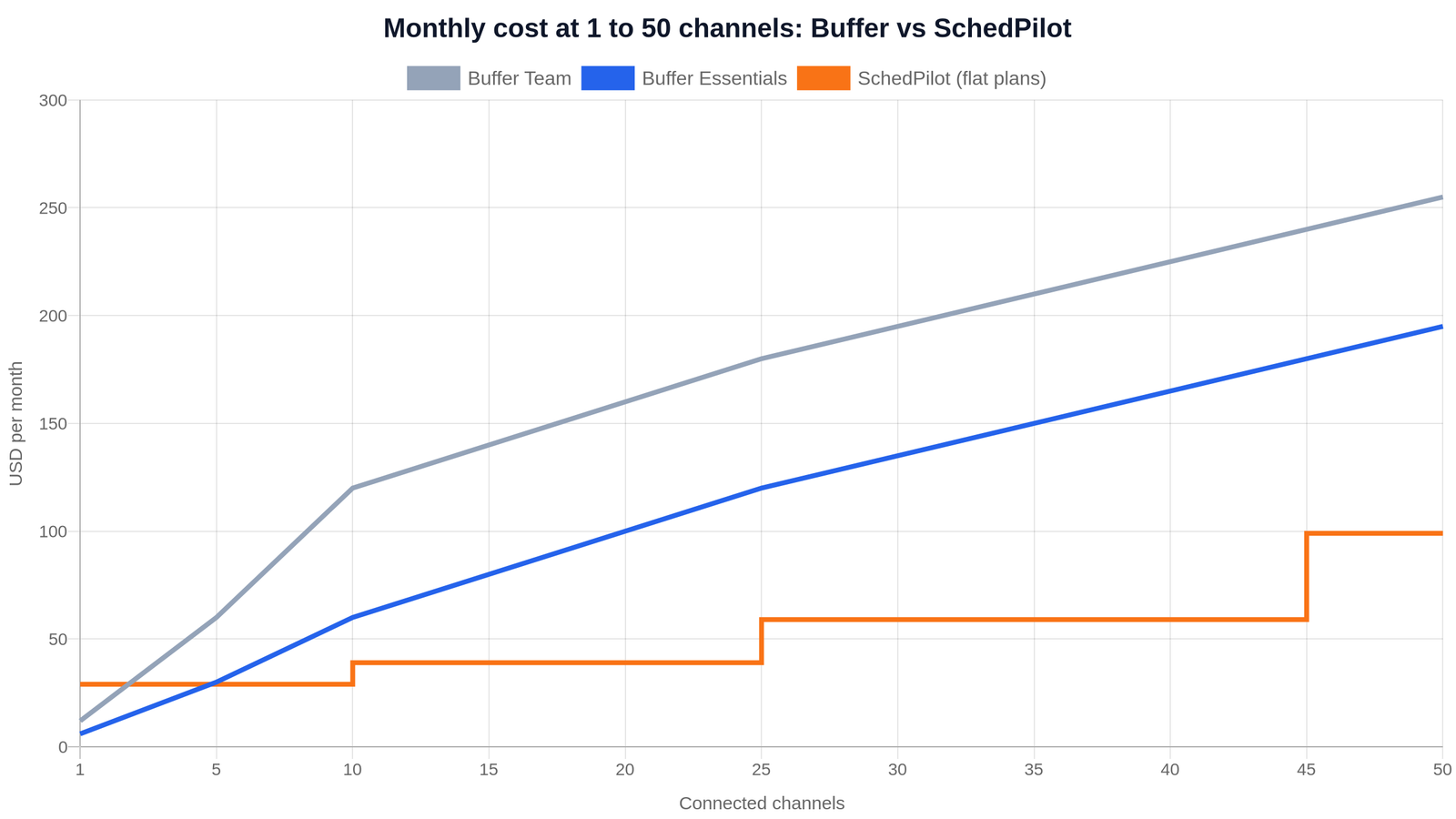
Buffer’s bill grows with every channel. A flat-priced plan stays put until you move up a tier.
Monthly vs yearly billing
Yearly billing gives you 12 months for the price of 10. Buffer’s pricing table calls it “save 2 months,” which is about a 17% discount. Its FAQ calls it 20%, but the published yearly totals match the two-free-months version, so plan on 17%.
On 10 Essentials channels that’s $600 a year instead of $720. On 25 Team channels it’s $1,800 instead of $2,160.
Yearly makes sense when your channel count is stable. If you add and drop client accounts often, monthly billing keeps you from paying up front for channels you may remove.
Discounts, the free trial, and the fine print
- 14-day free trial. No card needed. Buffer puts you on the Team plan for the trial so you can test everything.
- When the trial ends without payment details, your account drops to Free. Posts already scheduled still publish, but any channels over the 3-channel limit get locked.
- Nonprofit discount. Buffer’s pricing page offers nonprofits and charities 50% off paid plans.
- “Unlimited” means 5,000. Paid plans cap scheduled posts at 5,000 per channel under fair use. You won’t hit it unless you bulk-load years of content.
- Cards only. Visa, Mastercard, American Express, JCB, Discover and Diners Club. No PayPal, checks or bank transfers.
- Prices last changed in November 2025, according to Buffer’s pricing page.
Buffer API limits by plan
Every Buffer plan includes API access, which matters if you want an AI agent or automation tool to post for you. The limits scale with the plan:
| Limit | Free | Essentials | Team |
|---|---|---|---|
| API keys | 1 | 3 | 5 |
| Requests per 15 minutes | 150 | 450 | 1,500 |
| Requests per 24 hours | 600 | 1,800 | 6,000 |
| Requests per channel per month | 1,000 (max 3,000) | 3,000 (max 30,000) | 10,000 (max 100,000) |
For a person scheduling posts by hand, these limits never come up. They matter for agents and scripts that check status, upload media and retry. We compare the options for developers in Buffer API alternative.
When Buffer is the cheaper choice, and when it isn’t
Short answer: Buffer wins below about 7 accounts. A flat-priced scheduler wins above that.
Here’s Buffer next to SchedPilot, which charges one price per plan whatever networks you connect:
| Accounts | Buffer Essentials | Buffer Team | SchedPilot |
|---|---|---|---|
| 3 | $18 ($15 yearly) | $36 ($30) | $29 ($21) Silver |
| 5 | $30 ($25) | $60 ($50) | $29 ($21) Silver |
| 7 | $42 ($35) | $84 ($70) | $39 ($35) Gold |
| 10 | $60 ($50) | $120 ($100) | $39 ($35) Gold |
| 20 | $100 ($83.33) | $160 ($133.33) | $39 ($35) Gold |
| 25 | $120 ($100) | $180 ($150) | $59 ($49) Platinum |
| 40 | $165 ($137.50) | $225 ($187.50) | $59 ($49) Platinum |
| 50 | $195 ($162.50) | $255 ($212.50) | $99 ($79) Enterprise |
| 100 | $245 ($204.17) | $355 ($295.83) | $99 ($79) Enterprise |
Prices are per month on monthly billing, with the yearly-billing monthly price in brackets.
Buffer is cheaper if you run 1 to 4 accounts (4 channels on Essentials is $24, or $20 yearly) or exactly 6. At 5 accounts the two are about even, and at 7 on yearly billing they tie at $35. If that’s your size, Buffer is a good, well-built choice and we’d tell you to use it.
Buffer Team is also cheaper for small teams. SchedPilot’s team seats and approval workflow start on Enterprise ($99, or $79 yearly). A team running up to 8 channels on monthly billing, or up to 7 on yearly billing, pays less on Buffer Team.
A flat price wins from about 8 accounts up, and the gap keeps widening. At 20 accounts Buffer Essentials is $100 a month against $39. At 40 accounts it’s $165 against $59.
At 100 accounts the difference is hard to ignore. SchedPilot Enterprise covers 100 accounts for $99 a month ($79 on yearly billing), with 10 team seats and approvals included. The same 100 channels on Buffer cost $245 a month on Essentials and $355 on Team, which is the plan you’d need for seats and approvals. That’s $2,940 to $4,260 a year on Buffer against $1,188 on SchedPilot (or $948 yearly). For agencies and multi-brand teams, it’s the biggest saving on this page.
If you’re past that point, it’s worth comparing the main alternatives to Buffer at your own account count before you renew.

Try SchedPilot for free
Free trial · No upfront payment · 10+ platforms
Post on 10 platforms at once. Great for influencers, marketers, agencies.
What you get with SchedPilot instead
SchedPilot connects Instagram, TikTok, LinkedIn, YouTube, X, Facebook, Threads, Bluesky and Pinterest. Plans, from our pricing page:
- Silver, $29 a month or $21 yearly: 5 accounts, 450 posts a month, analytics, carousels, AI post suggestions and API access.
- Gold, $39 or $35 yearly: 20 accounts, unlimited posts, 5 workspaces, AI-written posts and hooks, replies to comments, 300 GPT-5 credits.
- Platinum, $59 or $49 yearly: 40 accounts, 10 workspaces, the Chrome extension, 5,100 GPT-5 credits.
- Enterprise, $99 or $79 yearly: 100 accounts, 20 workspaces, 10 team seats, approval workflow, advanced reports, a dedicated account manager.
Every plan includes our REST API and MCP server, so Claude, ChatGPT, Cursor or an n8n workflow can draft and schedule posts across all your accounts. See scheduling posts with Claude for how that works.
Where we’re weaker, so it doesn’t surprise you:
- No free-forever plan. The 7-day trial asks for a card and charges $0 until it ends.
- Silver caps you at 450 posts a month. Buffer’s paid plans don’t have a monthly cap.
- Team seats and approvals only come with Enterprise.
- Buffer supports Google Business Profiles, Mastodon and Substack Notes. We don’t.
- No social listening, and fewer third-party integrations than Buffer.
For a feature-by-feature look, read Buffer vs SchedPilot. For the wider market, see our Buffer alternatives and the cheapest social media schedulers. If you’re weighing the bigger names too, read Buffer vs Hootsuite, Buffer vs Later and our Hootsuite pricing breakdown.
Which Buffer plan should you pick?
- 1 to 3 accounts, a few posts a week: stay on Buffer Free.
- Up to 6 accounts, working alone: Buffer Essentials on yearly billing.
- A small team on up to 8 accounts that needs approvals: Buffer Team.
- 8 or more accounts, or a growing client list: per-channel billing costs you more every month. Compare a flat-priced plan or one of the apps like Buffer before you commit to a year of Buffer.
Our suggestion: count your accounts today and the ones you expect in six months, and price both numbers in the table above. If the second number lands past 8, start a SchedPilot trial on Gold and load a month of posts in the first week. If it doesn’t fit, cancel before day 8 and you pay nothing.
Try SchedPilot for free
Free trial · No upfront payment · 10+ platforms
Post on 10 platforms at once. Great for influencers, marketers, agencies.
Buffer pricing FAQ
How much does Buffer cost per month?
Buffer Essentials costs $6 per channel a month, or $5 on yearly billing. Team costs $12 per channel, or $10 yearly. Channels after the 10th are cheaper. Five channels on Essentials cost $30 a month and 20 channels cost $100.
Is Buffer free?
Yes. Buffer’s free plan costs nothing and has no time limit. It covers 3 channels, 10 scheduled posts per channel, 1 user and 30 days of analytics.
Does Buffer charge per user or per channel?
Per channel. Users don’t change the price. Essentials allows 1 user and Team allows unlimited users.
What counts as a channel in Buffer?
Each connected social account, page or profile is one channel. An Instagram account and a Facebook Page for the same brand are two channels.
Does Buffer have a free trial?
Yes. Paid plans come with a 14-day free trial, and you don’t need a card to start. If you don’t add payment details, your account moves to the free plan when the trial ends.
Is Buffer cheaper if you pay yearly?
Yes. Yearly billing charges 10 months for 12, which saves about 17%. Essentials drops from $6 to $5 per channel and Team from $12 to $10.
Does Buffer offer a nonprofit discount?
Yes. Buffer’s pricing page offers nonprofits and charities 50% off paid plans.
Do I pay for my 3 free channels when I upgrade?
Yes. Once you move to a paid plan, Buffer bills every connected channel, including the three you had on the free plan.
What are the best alternatives to Buffer?
It depends on how many accounts you run. Past about 8 accounts, a flat-priced scheduler like SchedPilot costs less than Buffer. Publer and Metricool have free tiers, and Postiz and Mixpost are open-source tools you can host yourself. We compare 10 hosted and 5 open-source options in our Buffer alternatives guide.
Related posts
Hootsuite Pricing in 2026: What You’ll Pay Per User, and a Cheaper Way to Run 100 Accounts
November 13, 2026
Is a Buffer Free Account Worth It? Free Plan Limits vs SchedPilot (2026)
October 30, 2026
11 best social media collaboration tools to simplify agency and marketing team work (2026)
March 22, 2026
hootsuite vs loomly
October 31, 2025